
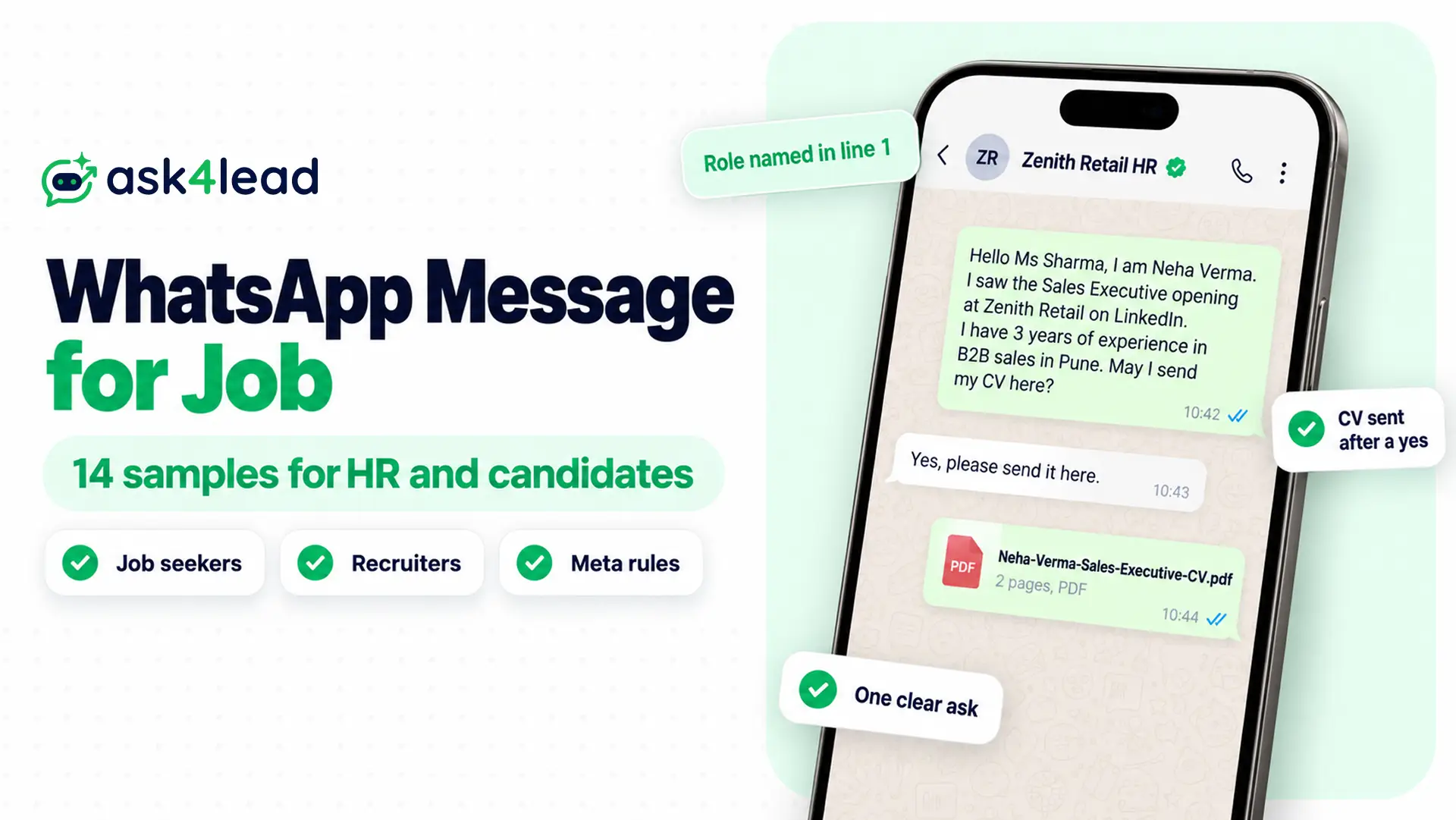
A WhatsApp message for job applications is a short note you send to a recruiter or HR manager to ask about a role, share a CV or follow up. Recruiters also send one to candidates, to screen them, invite them to an interview or share a result. So read the section for your side, then copy the sample that fits.
Below, you get 8 messages for job seekers and 6 for recruiters, plus the rules that keep both from looking like a scam. Recruiter messages sent at scale need the WhatsApp Business API, which is Meta’s paid version for businesses.
What is a WhatsApp message for job purposes?
A WhatsApp message for job purposes is a short, professional note between a candidate and a hiring team. Candidates use it to ask about an opening or send a CV (curriculum vitae, also called a resume). Recruiters use it to screen, invite and update applicants.
The sender decides the rules, because each side faces a different risk.
| Who sends it | What it does | Rule that matters |
| Job seeker to recruiter | Asks about a role, sends a CV, follows up | Ask before you attach any file |
| Recruiter to candidate | Screens, invites, reminds, updates | Opt-in first, then an approved template outside 24 hours |
| Recruiter to past applicants | Announces a new opening | A marketing template, sent only to people who agreed |
What to put in a WhatsApp message for job applications
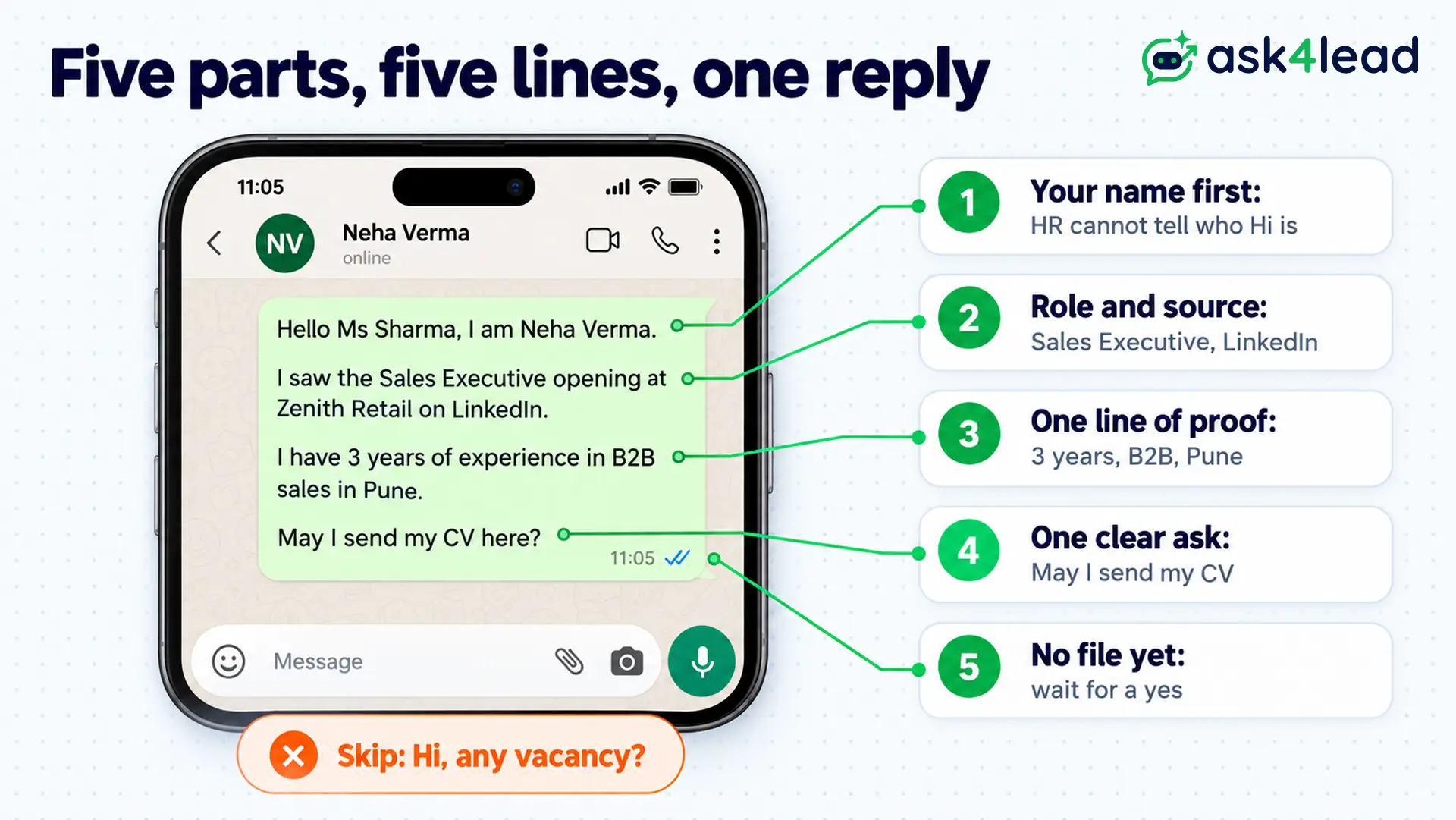
A good WhatsApp message for job applications has five parts and fits in four or five lines. Recruiters read these between calls, so a long message gets skipped. A message that names the role gets a reply, while “Hi, any vacancy?” does not.
Include these five parts, in this order:
- Your name first: HR rarely saves numbers, so the reader cannot tell who “Hi” is
- The role and where you saw it: for example, “Sales Executive, posted on LinkedIn”
- One line of proof: years of experience plus one specific skill or city
- One clear ask: “May I send my CV here?” works better than “any openings?”
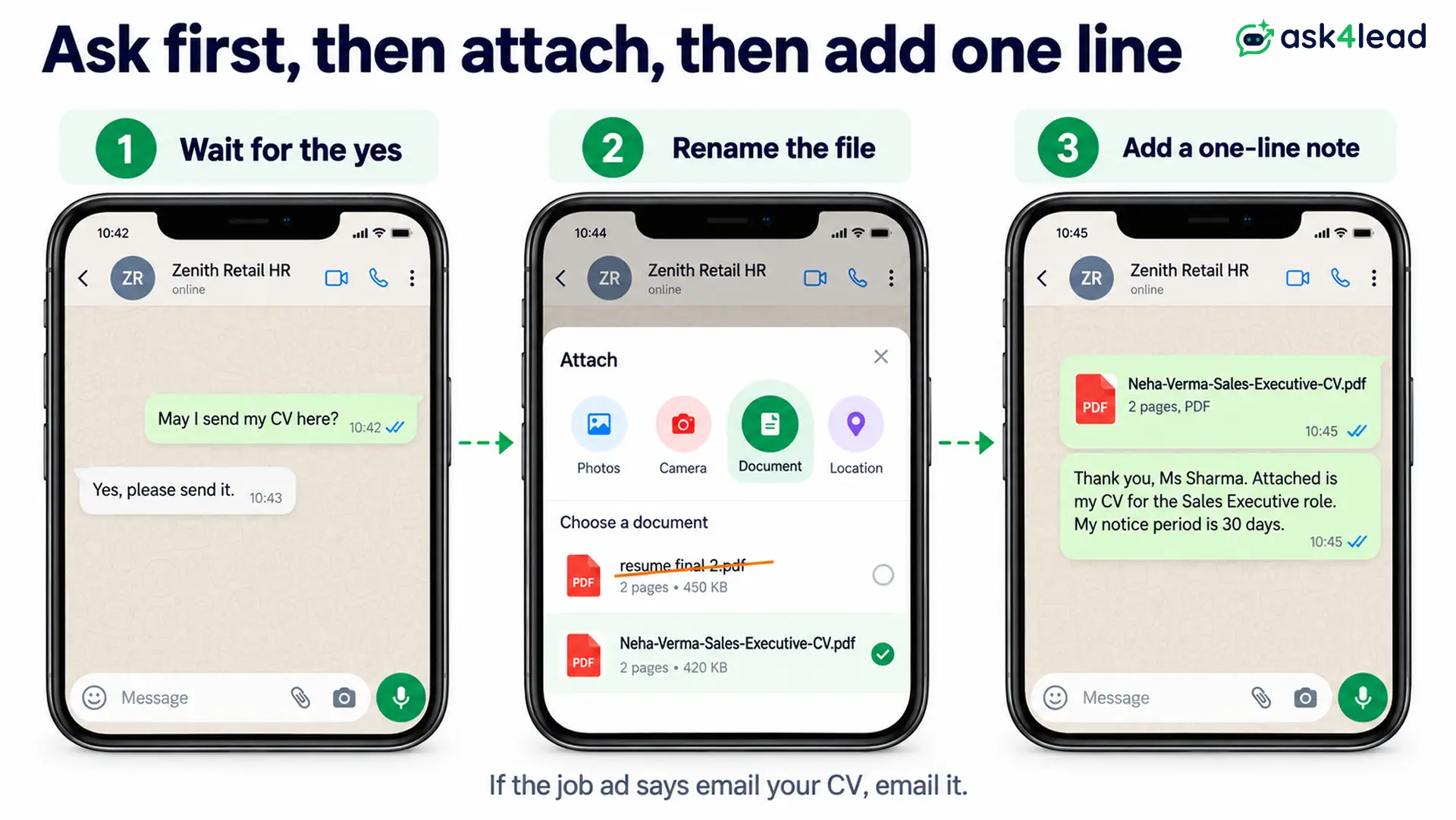
- No attachment yet: wait until the recruiter says yes
Also keep the tone formal, skip slang, and write in full sentences. Send it on a weekday during working hours, and follow up once, not daily. These habits work, but they are not WhatsApp rules.
However, this advice does not apply when a job ad says “email your CV”. In that case, email it, and use WhatsApp only to say you have done so.
8 WhatsApp messages for job seekers to copy
Replace the words in square brackets with your own details. Each message uses the same five parts, so it fits any role.
1. WhatsApp message for job enquiry to HR
Use this when you have seen an opening and have no contact at the company. For other first messages, see this WhatsApp introduction message guide.
Hello [Ms Sharma], I am [Neha Verma]. I saw the [Sales Executive] opening at [Zenith Retail] on [LinkedIn]. I have [3 years] of experience in [B2B sales in Pune]. May I send my CV here?
2. Referral message to a hiring manager
A referral turns this WhatsApp message for job outreach into a warm introduction, so name the person who suggested you in the first line.
Hello [Mr Rao], [Amit Joshi] from your [finance] team suggested I message you about the [Accounts Executive] role. I have [4 years] of experience in [GST filing and reconciliation]. Could I share my CV with you?
3. Reply to a recruiter who messaged you first
Some recruiter messages are real, and some are scams. So use this WhatsApp message for job offers you did not ask for, and request basic details first.
Hello [Priya], thank you for reaching out about the [Customer Support Lead] role. Could you share the company name, the office location and the salary range? I will send my CV once I have those details.
4. Sending your CV after the recruiter says yes
Attach the CV as a PDF, and rename the file first. “Neha-Verma-Sales-Executive-CV.pdf” tells the recruiter what it is, while “resume final 2.pdf” does not.
Thank you, [Ms Sharma]. Attached is my CV for the [Sales Executive] role. I am based in [Pune], and my notice period is [30 days].
5. Message after you apply online
Send this WhatsApp message for job applications a day after you apply on a careers page or portal.
Hello [Mr Rao], I applied for the [Accounts Executive] role on [your careers page] on [21 October]. I am sharing this note in case the application needs a second look. I can send details of my [GST experience] if useful.
6. Follow-up when nobody replies
Wait a week, then send this WhatsApp message for job follow-up once.
Hello [Ms Sharma], I am following up on my application for [Sales Executive], sent on [14 October]. Is the position still open, and do you need anything more from me?
If nobody replies, move on, because a second follow-up reads as pressure.
7. Confirming an interview slot
Reply quickly with this WhatsApp message for job interviews, and repeat the date so both sides match.
Thank you for shortlisting me, [Ms Sharma]. I can attend on [Thursday, 30 October at 11 am] at [your Pune office]. Please confirm the slot and tell me who to ask for at reception.
8. Thank-you message after the interview
Send it the same day.
Thank you for meeting me today, [Mr Rao]. I enjoyed learning about [the regional sales plan], and I remain very interested in the role. Could you tell me when to expect a decision?
6 WhatsApp messages for job candidates (for recruiters)
A recruiter’s WhatsApp message for job candidates faces stricter rules than a candidate’s. Meta lets you message people only after they opt in, meaning they agreed to hear from you. Outside the 24-hour window, you also need an approved template.
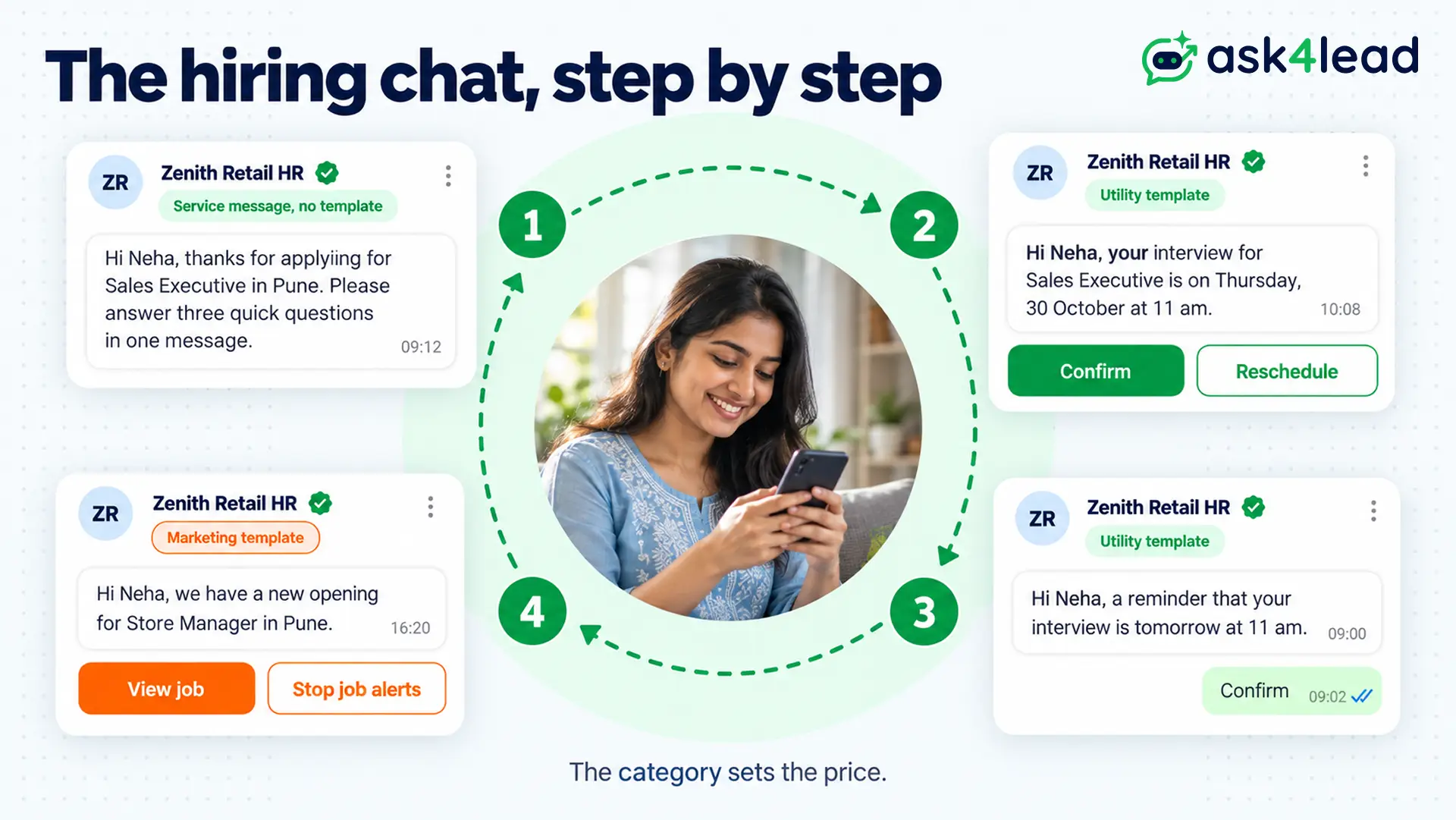
Each sample below shows the category, because the category sets the price. The words in {{double brackets}} are variables, which fill in automatically for each candidate.
1. Application received
Send this the moment someone applies, so they know you got it. Save the same wording as a chat snippet if your team replies by hand.
Hi {{1}}, we have received your application for {{2}} at {{3}}. Our team reviews applications within {{4}} working days. We will message you here with the next step.
Category: utility. Because it confirms an action the candidate took, it contains no offer.
2. Screening questions after “Apply on WhatsApp”
Candidates who tap an apply link on WhatsApp write to you first. So you can reply freely, without a template.
Hi [Neha], thanks for applying for [Sales Executive] in [Pune]. Please answer three quick questions in one message: 1) How many years of sales experience do you have? 2) What is your notice period? 3) What salary do you expect?
Category: service message, because the candidate wrote first. Keep it to three questions, since long forms lose people.
3. Interview invitation
Hi {{1}}, your interview for {{2}} is on {{3}} at {{4}}. The venue is {{5}}. Please bring your CV and one photo ID. Tap below to confirm or ask for another time.
Buttons: Confirm · Reschedule
Category: utility. A confirm button gives you a written reply, and a reschedule button saves a phone call.
4. Interview reminder
Hi {{1}}, a reminder that your interview for {{2}} is tomorrow at {{3}}. Please tap Confirm if you can attend, or Reschedule if you cannot.
Buttons: Confirm · Reschedule
Category: utility. Send it the day before, because a reminder on the morning of the interview arrives too late to rebook.
5. Not shortlisted
A clear no is kinder than silence. In addition, the button below records a clear yes from candidates who want future openings.
Hi {{1}}, thank you for interviewing for {{2}}. We have chosen another candidate for this role. We would like to keep your profile for future openings.
Buttons: Keep my profile · No thanks
Category: utility. Do not add a new job to this message, because Meta treats promotion as marketing.
6. New opening for past applicants
This message promotes a job, so Meta prices it as marketing. Send it only to candidates who opted in, and see this guide on how to collect more WhatsApp opt-ins.
Hi {{1}}, we have a new opening for {{2}} in {{3}}, close to the role you applied for earlier. Tap below to read the details and apply.
Buttons: View job · Stop job alerts
Category: marketing. Always include a stop button, so candidates can leave without blocking you.
Meta rules for a WhatsApp message for job candidates
Meta does not single out recruitment in its Business Messaging Policy (updated 23 September 2026). So every WhatsApp message for job candidates follows the general rules, and breaking them costs you a rejected template or a restricted number.
Opt-in comes before the first message
Meta’s policy allows you to contact people only if they gave you their number and agreed to receive messages.
For candidates, add a clear tick box to the application form, for example “Send me updates about this application on WhatsApp”.
This opt-in consent guide shows the wording.
The category decides the price
| Message | Category | Why |
| Application received, interview invite, reminder, rejection | Utility | Because each one updates an application the candidate made |
| Screening reply after the candidate writes first | Service | Since it answers inside the 24-hour window |
| New opening for past applicants | Marketing | Because it promotes a job |
Meta’s template categorization page says utility templates must not carry promotional or persuasive intent. So Meta can recategorise a utility template that contains an offer as marketing.
Why Meta rejects hiring templates
Check your template against these causes before you submit it:
- A promotion inside a utility template: “Apply for our other roles too” turns an interview invite into marketing
- A variable at the start or end: keep fixed text around every {{1}}
- No sample values: reviewers need examples such as “Sales Executive” and “Thursday, 30 October”
If a template still fails, this guide to a rejected WhatsApp template matches each reason to a fix. This is general information, not legal advice, so check Meta’s current policy for your case.
How to spot a fake WhatsApp message for job offers
WhatsApp’s own Help Center lists a job offer among the signs of a suspicious message. It describes the employment scam as someone posing as a recruiter at a well-known company, who then asks for personal information or money.
So candidates must avoid scammers, and recruiters must not look like one.
Red flags for candidates
Treat the message as unsafe if it:
- Asks for money: a registration fee, a training fee or a “refundable” task deposit
- Pushes a link or an app: WhatsApp lists both as warning signs
- Asks for bank or card details: no real employer needs them before an offer
- Promises high pay for light work: WhatsApp notes these scams often offer well-paid, work-from-home jobs
For a first contact, WhatsApp shows the sender’s country and any groups you share. So check the country code before you reply. In India, report money lost to fraud on the National Cyber Crime Reporting Portal or through the 1930 helpline.
How recruiters look genuine
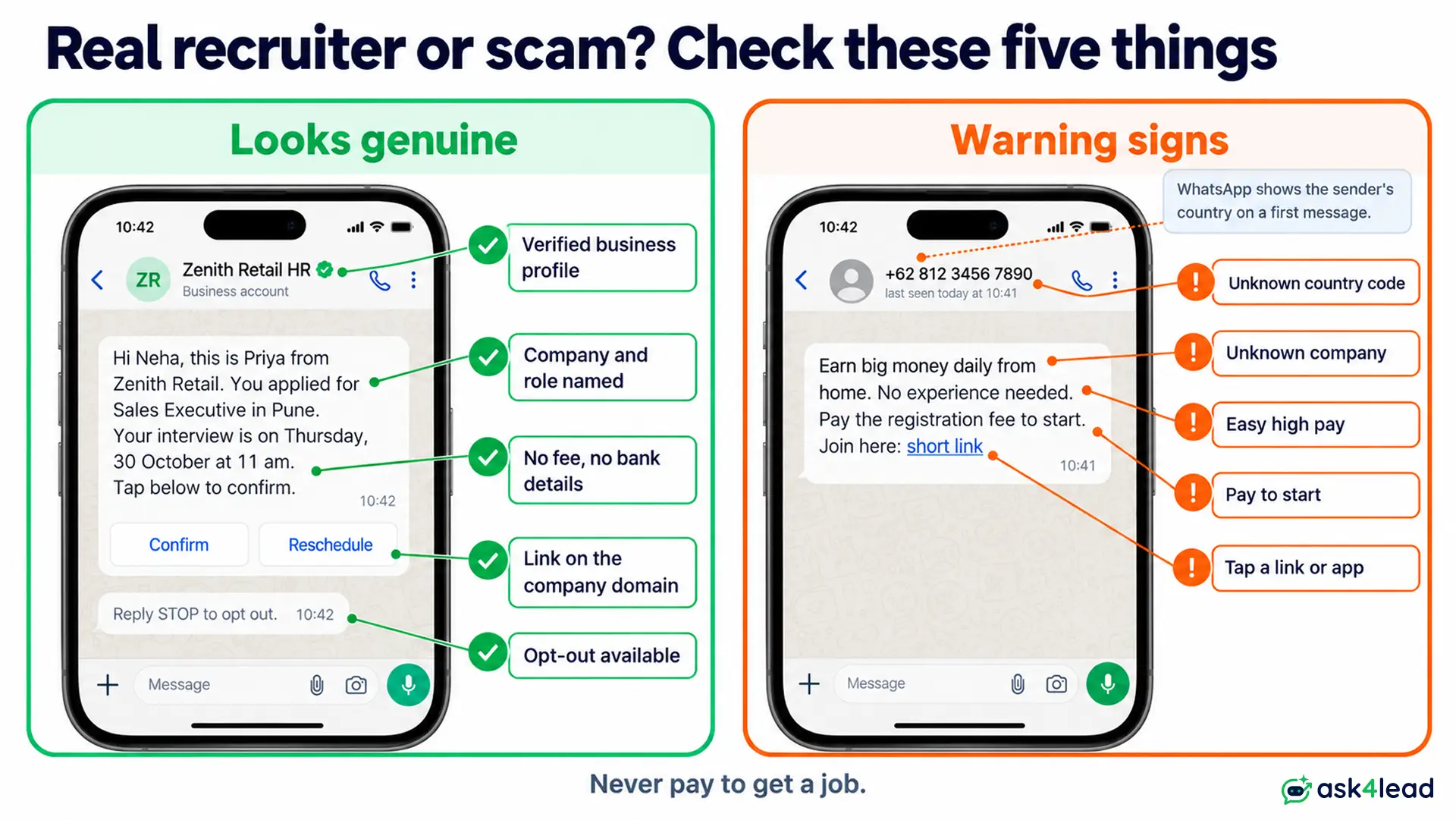
- Name the company and role in the first line: senders who skip this look like scammers
- Use a business profile: a verified business shows the green tick
- Never ask for fees, OTPs or bank details: not at any stage
- Link only to your company domain: avoid shortened links
- Give an opt-out: the stop button in sample 6 does this
Two worked examples: what a WhatsApp message for job candidates costs
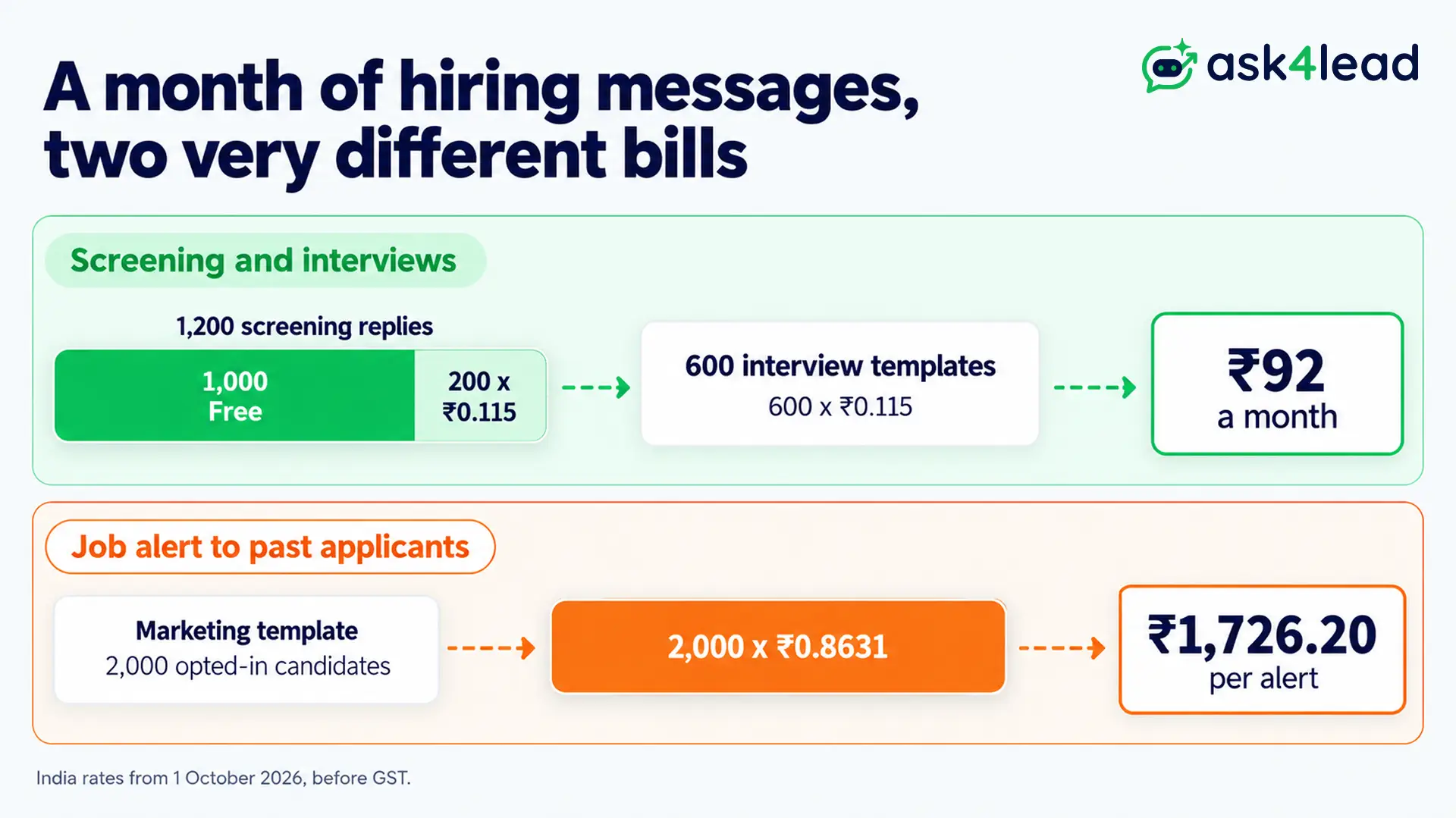
These numbers use Meta’s India rates from 1 October 2026, before GST. A service or utility message costs ₹0.115, and a marketing message costs ₹0.8631. Meta’s pricing page also gives each business number 1,000 free service messages a month.
Worked example: a month of screening and interviews
Suppose 1,200 candidates tap your apply link and write to you first. You reply with the screening questions. Then you invite 300 of them and send each an invitation and a reminder.
- Screening replies: 1,200 − 1,000 free = 200 × ₹0.115 = ₹23
- Interview messages: 300 × 2 = 600 utility templates × ₹0.115 = ₹69
- Monthly total: ₹92
Since 1 October 2026, Meta also charges utility templates sent inside an open window. However, if candidates arrive from a Click-to-WhatsApp job ad, the free entry point window applies, and those messages cost nothing for up to 7 days.
Worked example: a job alert to past applicants
Now suppose you send a new-opening template to 2,000 opted-in past applicants.
- Per alert: 2,000 × ₹0.8631 = ₹1,726.20
- Two alerts a month: ₹3,452.40
So send alerts only to matching candidates. The WhatsApp API pricing guide lists rates for other markets.
FAQs
1. How do I write a WhatsApp message for a job application?
Name yourself, the role and where you saw it, add one line of proof, and ask one clear question. Send your CV only after the recruiter agrees.
2. Can I send my CV on WhatsApp?
Yes, if the recruiter agrees or the job ad asks for it. Send a PDF named with your name and the role, and add a one-line note.
3. Can recruiters message candidates on WhatsApp without permission?
Not through the API. Meta’s policy requires opt-in, so add a consent tick box to your application form.
4. How do I know if a WhatsApp job message is fake?
Be careful if the sender asks for money, a link or bank details. Then check the company on its own website, and never pay to get a job.
Conclusion
A strong WhatsApp message for job seekers names the role and asks one question, while a strong recruiter message names the company and respects opt-in. So write for the reader’s next action, and keep money and bank details out of every chat.
Before you send your next WhatsApp message for job outreach, check that it has:
- Your name or company name in the first line
- The role and where you saw it, so nobody has to guess
- One clear ask, such as “May I send my CV here?”
- No fee, link or bank request, at any stage
- The right category, if you are a recruiter sending templates
Reply to every applicant, even at midnight
Applications arrive after hours, and replies wait until morning, so strong candidates move on. Ask4Lead sells the tools below, and they cover four steps:
- Screening in the chat: the AI Sales Assistant asks follow-up questions and saves answers on a lead record
- Answers from your job description: the AI Knowledge Profile answers from the documents you upload
- One number for the team: a shared team inbox lets several recruiters reply from the same number
- Interview templates: track each WhatsApp template from Pending to Approved or Rejected
