
A WhatsApp alert message is a short, time-sensitive update that a business sends about something the customer already uses, such as a login, a payment, an order or a service outage. Below are 16 samples to copy, grouped by job. Each one notes the Meta category it will likely get.
Every WhatsApp alert message you start on the WhatsApp Business API (Meta’s paid system for messaging at scale) needs an approved template. That is because you can type freely only inside the 24-hour customer service window. However, if alerts on your own phone stopped working, skip to “Why customers miss a WhatsApp alert message” near the end.
What a WhatsApp alert message must include
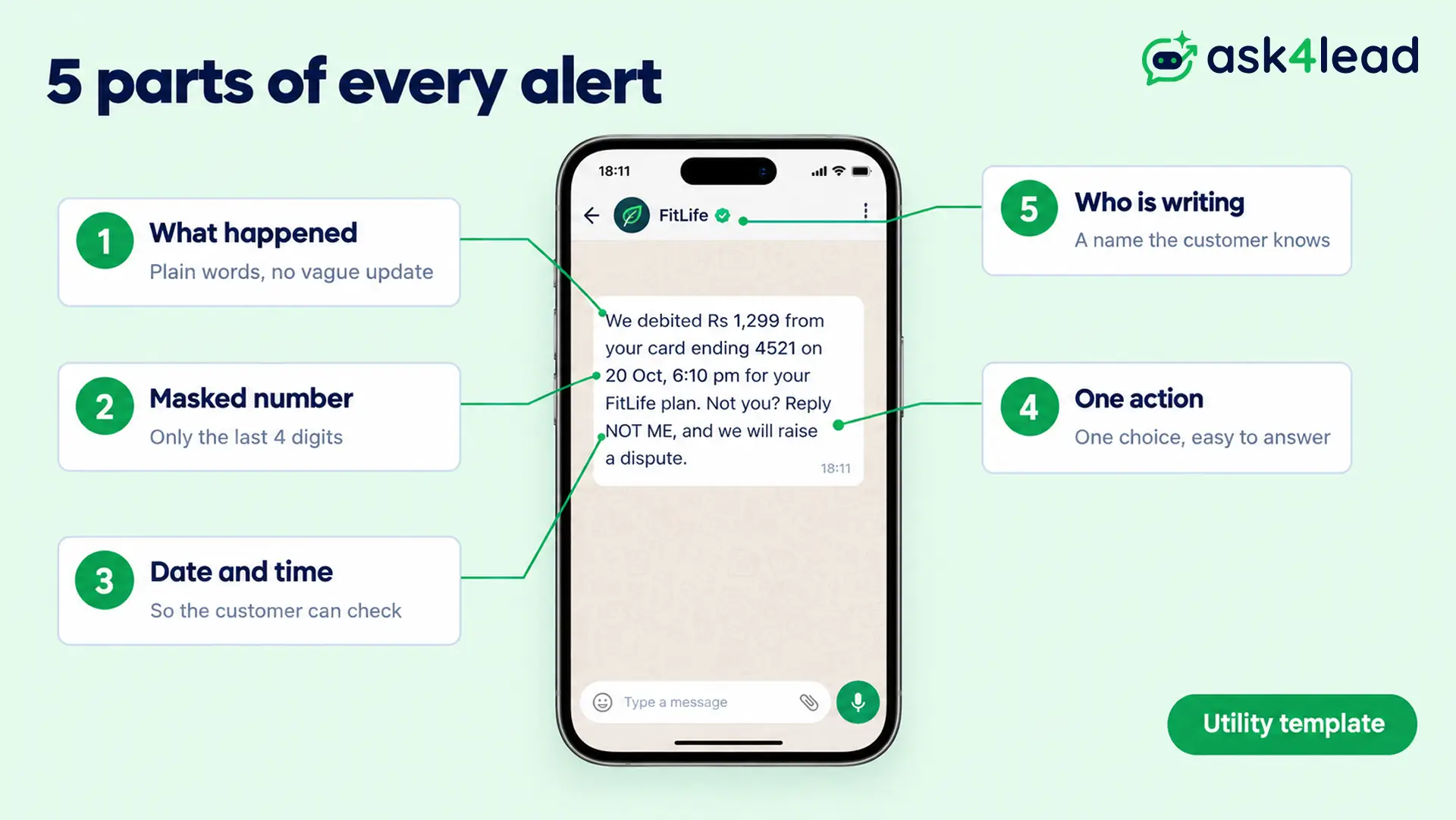
A good WhatsApp alert message answers four questions in a few lines: what happened, to which account or order, when, and what to do next. The same goes for any WhatsApp notification message, so every sample below carries the details in this table.
| Detail | Example | Why it matters |
| What happened | New login on your account | Because a vague “important update” looks like phishing |
| Masked number | Card ending 4521 | Since a full number in a chat helps fraudsters |
| Date, time and place | 20 Oct, 10:42 pm, Pune | So the customer can tell at once whether it was them |
| One clear action | Reply NOT ME, or tap a button | Because one choice gets a faster answer than a paragraph |
| Who is writing | Brand name and support number | So the customer knows how to reach a real person |
Replace each bracketed detail, such as [Priya], before you submit a sample.
Security and account WhatsApp alert message samples
An account alert message protects the customer’s own account, so Meta usually files it as utility. Send it within minutes of the event, and show only the last 4 digits of any number.
Also, never ask for a password or OTP in the reply, since that is exactly what scammers ask for.
1. New device login alert
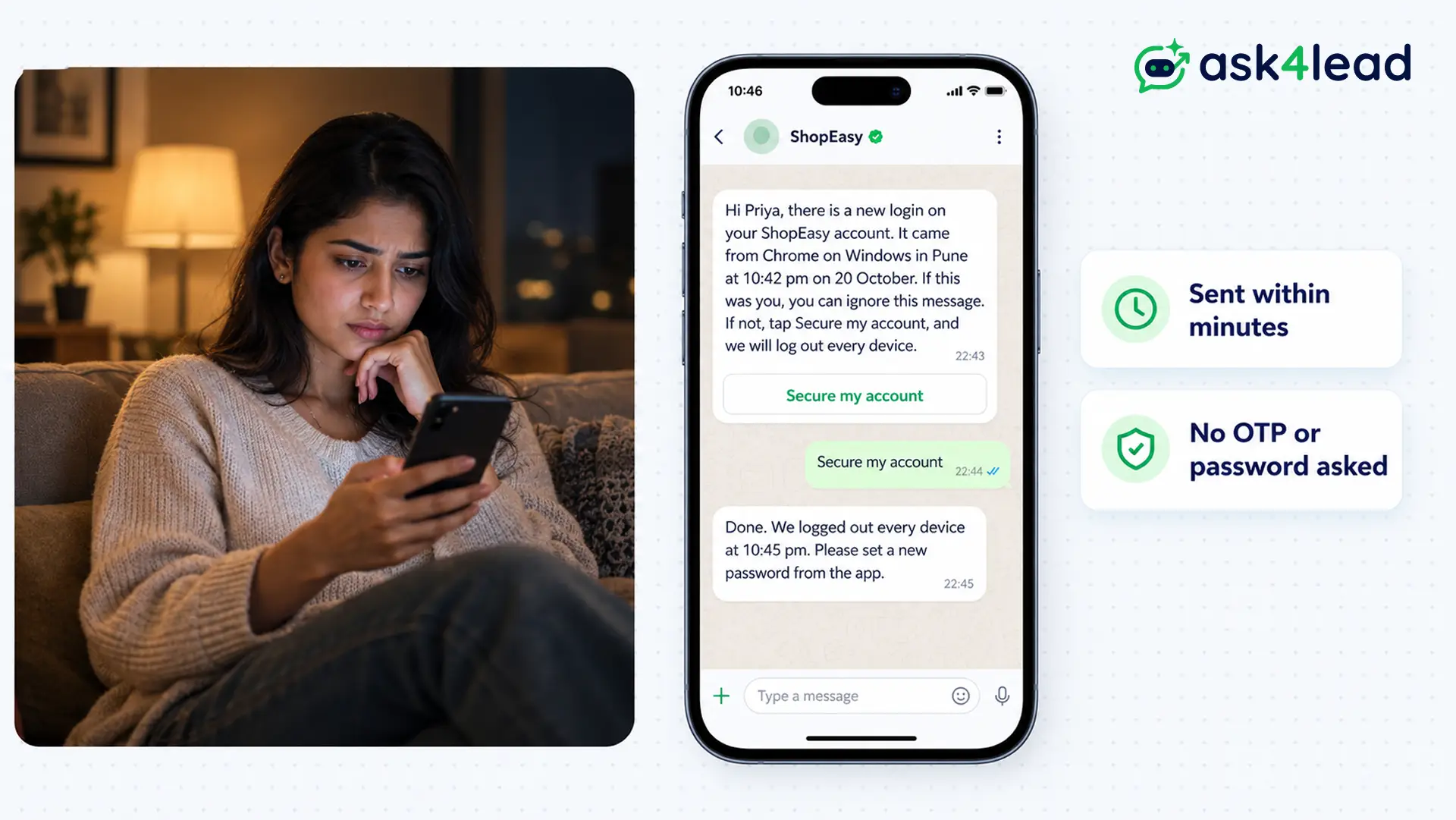
Hi [Priya], there is a new login on your [ShopEasy] account. It came from [Chrome on Windows] in [Pune] at [10:42 pm] on [20 October]. If this was you, you can ignore this message. If not, tap Secure my account, and we will log out every device.
Button: Secure my account
2. Password changed alert
Hi [Priya], your [ShopEasy] password changed on [20 October] at [10:45 pm]. If you did not make this change, reply NOT ME, and our team will lock the account while we check.
3. Email or mobile number changed alert
Hi [Priya], your [ShopEasy] account email changed from [p***@gmail.com] to [p***@outlook.com] on [20 October]. If you did not ask for this, call us on [1800 XXX XXXX] today.
Also send it to the old number or email, because a fraudster will not report their own change.
One thing you cannot send as an account alert is a one-time passcode. Meta allows OTPs only in authentication templates, which bar links, media and emojis and cap each variable at 15 characters. So build your OTP message from Meta’s template library instead.
Payment and billing WhatsApp alert message samples
Payment alerts confirm money that moved, or warn about a failed or upcoming charge. They stay utility while they describe the customer’s own account. However, a line that asks the customer to renew or upgrade turns the same alert into marketing.
4. Payment debited alert
We debited [Rs 1,299] from your card ending [4521] on [20 Oct, 6:10 pm] for your [FitLife] plan. Not you? Reply NOT ME, and we will raise a dispute.
In fact, Meta’s own utility example is a daily balance alert for an “account ending in” 4 digits. Banks also follow SMS rules, which this money transfer message format guide covers.
5. Payment failed alert
Hi [Rohan], your [Rs 1,299] payment for [FitLife] did not go through on [20 October], because your bank declined it. Your plan stays active until [25 October], so you can retry from [Billing in the app].
6. Upcoming auto-debit alert
Hi [Rohan], we will charge [Rs 1,299] for [FitLife] to your card ending [4521] on [1 November]. You need to do nothing, unless you want to change the card.
Meta’s own utility example is a monthly payment notice that names the service and the billing date. In contrast, an “expires soon, renew today to save” line sits in Meta’s marketing list.
7. Low balance alert
Hi [Anita], your [travel wallet] balance is [Rs 120] as of [20 October]. You can top up anytime from [Wallet in the app], so your next booking goes through.
Order and delivery WhatsApp alert message samples
Order alerts tell customers that something changed with an order they placed. Meta’s categorization rules list order confirmations, shipping updates, backorders and refunds as utility. So keep the order number in the body, and leave discount codes out.
8. Delivery delay alert
Hi [Meera], order [#48213] is running late because of [heavy rain in Mumbai]. Your new delivery date is [24 October], and you can track it here: [tracking link]
9. Out for delivery alert
Hi [Meera], order [#48213] is out for delivery today between [2 and 6 pm]. Please keep [Rs 849] ready, since you chose cash on delivery.
For the full order sequence, see this guide to order notification automation.
10. Product recall alert
Hi [Meera], we are recalling the [AquaPure water purifier] you bought on [2 September]. Its [power adapter can overheat], so please stop using it and tap Arrange pickup for a free replacement.
Meta lists product recalls as “essential or critical”, so this alert stays utility although the customer never asked.
Outage and maintenance WhatsApp alert message samples
Outage alerts cut the flood of “is it down?” messages, because customers hear it from you first. Meta counts outages and operational disruption as essential, so these alerts stay utility while they carry no offer.
11. Service outage alert
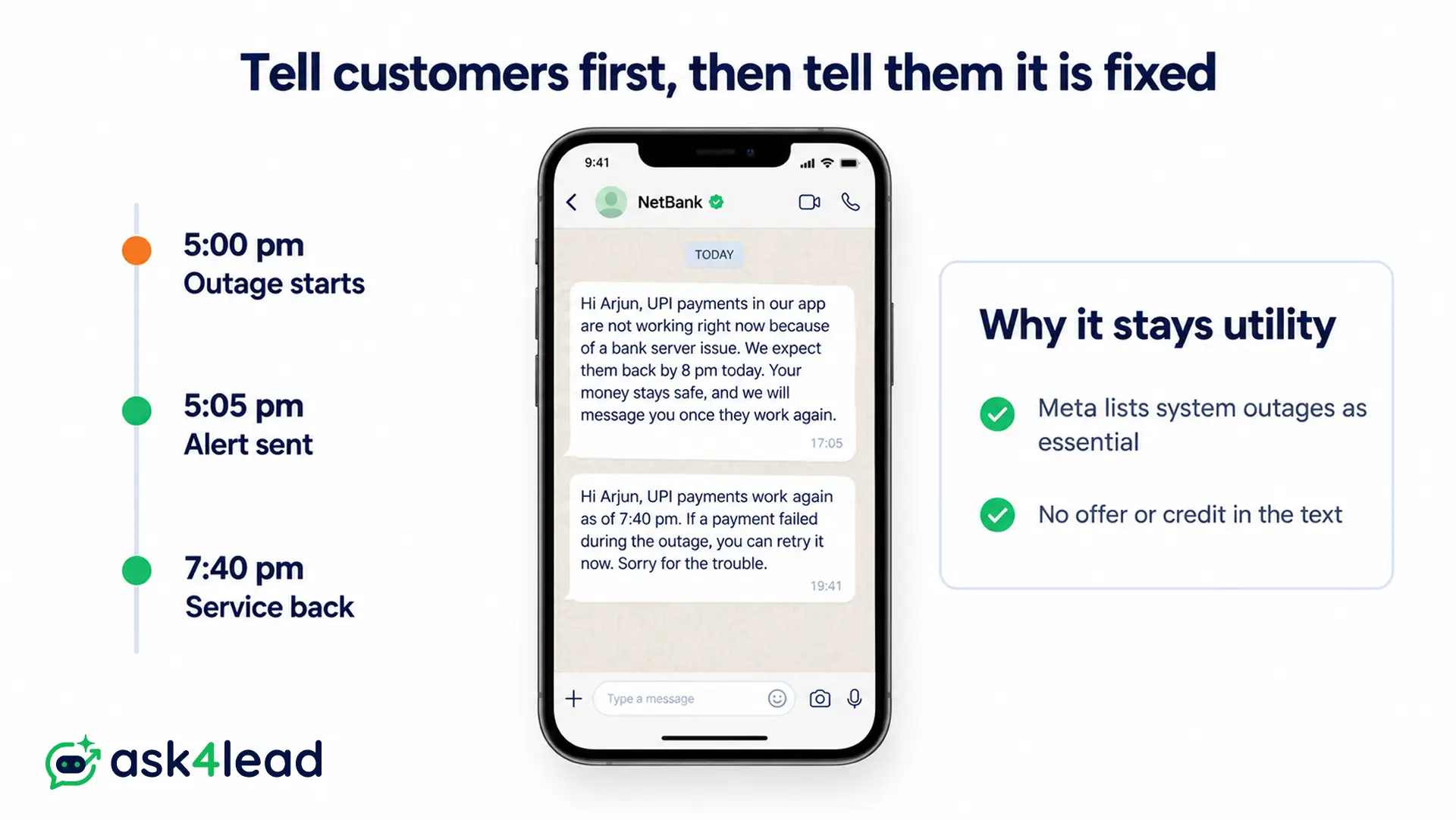
Hi [Arjun], [UPI payments in our app] are not working right now because of a [bank server issue]. We expect them back by [8 pm today]. Your money stays safe, and we will message you once they work again.
12. Service restored alert
Hi [Arjun], [UPI payments] work again as of [7:40 pm]. If a payment failed during the outage, you can retry it now. Sorry for the trouble.
13. Planned maintenance alert
Hi [Arjun], the [NetBank] app will be down on [Sunday, 26 October] from [1 am to 4 am] for planned maintenance. So please make any urgent transfers before then.
If the outage is on WhatsApp’s side instead, read what happens to your AI agent when WhatsApp goes down.
Fraud and safety WhatsApp alert message samples
Fraud and safety alerts warn customers before they lose money or face danger. Keep them calm and specific: name the scam, give one action and say what you never ask for. After all, scammers copy the look of real alerts.
14. Fraud awareness alert
Hi [Kavita], we have noticed fake calls that ask [ShopEasy] customers for refund OTPs. We will never ask for an OTP, PIN or password on a call or chat. If someone does, end the call and report it here.
Fake payment screenshots work the same way, as this guide to the money received message shows.
15. Suspicious payment alert
Hi [Kavita], we stopped a [Rs 18,500] payment on your card ending [4521] at [an overseas website]. It happened at [2:14 am] on [20 October]. Was this you?
Quick replies: Yes, it was me · No, block my card
16. Weather or office closure alert
Hi [Sameer], because of the [red rain alert in Chennai], our [T Nagar] branch stays closed on [21 October]. Your [appointment] moves to [23 October at 11 am], and you can reply here to pick another slot.
Which Meta category a WhatsApp alert message gets
Meta files a WhatsApp alert message as utility only when it is non-promotional. It must also concern the customer’s own order, account or service, or be essential to them, such as a fraud warning. Any offer, upsell or renewal push makes it marketing.
| Alert | Likely category | Why |
| Samples 1 to 16 | Utility | Since each concerns the customer’s own account, order or safety |
| One-time passcode | Authentication | Because Meta allows OTPs only in this category |
| “Final call: order before 6 pm for tomorrow’s delivery” | Marketing | Because it pushes a sale, even though it calls itself an alert |
| “Your plan expires on 31 Oct. Renew today and save 20%” | Marketing | Since Meta lists renewal pushes as marketing |
| Delay alert plus “We have added Rs 100 credit” | Marketing | Because Meta’s own marketing examples include an apology credit |
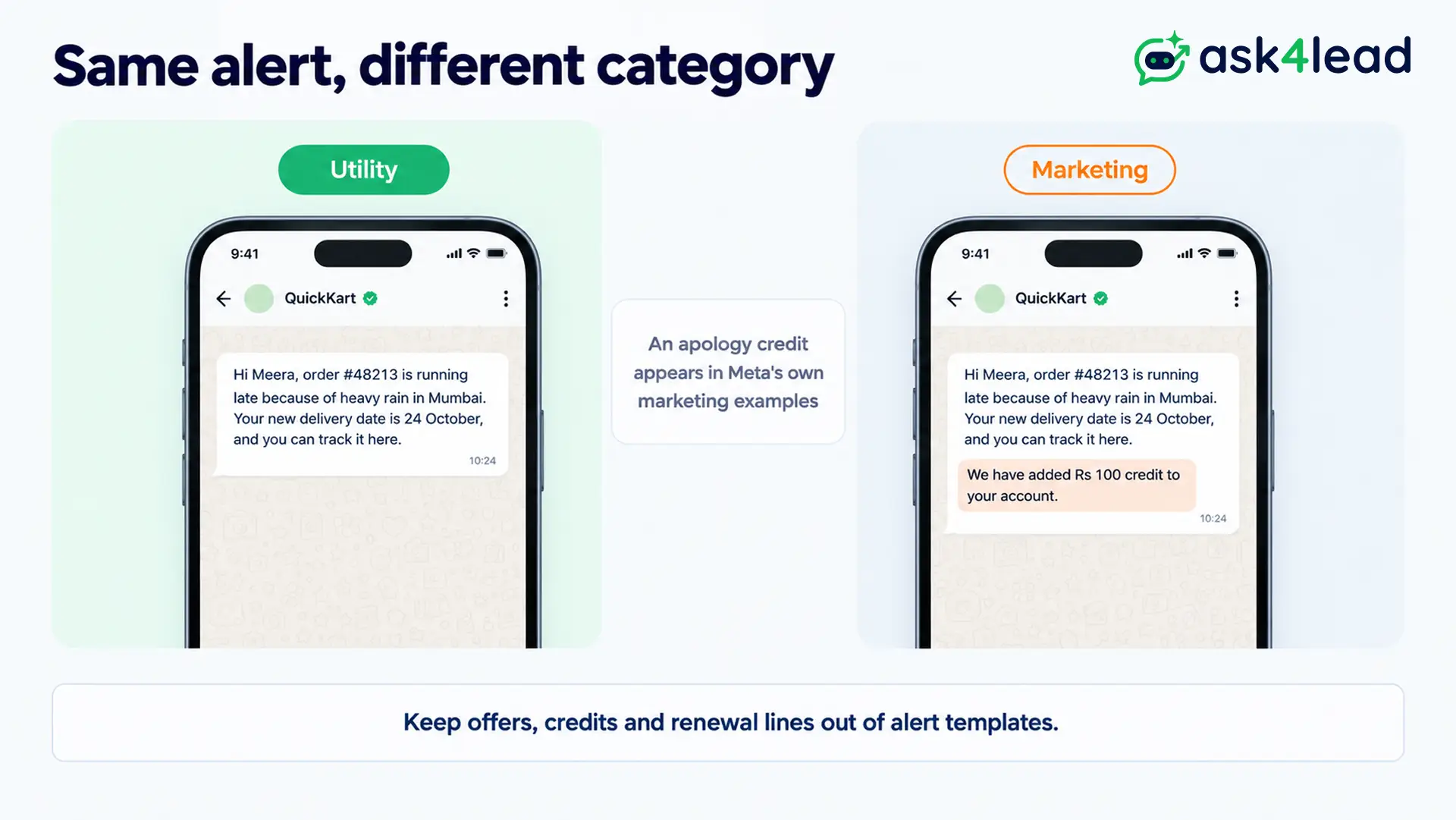
Since 9 April 2025, Meta approves a misfiled utility template as marketing instead of rejecting it. As a result, your price changes quietly, and repeated misfiling triggers the steps below.
What happens if you keep misfiling alerts
| Level | What Meta does | How long |
| Warning | Emails your admins, and later category changes happen instantly | Ongoing |
| Rate limiting | Caps utility volume in a rolling 24 hours and rejects the excess | At least 7 days |
| Utility restriction | Turns every utility template on the account into marketing | 7 days, or 30 days for repeats |
| Portfolio restriction | Does the same across every account in your business portfolio | 30 days |
So one misfiled offer template can stop your genuine fraud alerts too.
Why a WhatsApp alert message gets rejected
Meta usually rejects an alert template for its variables, not its topic. A variable is a numbered blank, such as {{1}}, that your software fills for each customer. Meta’s template review rules list these causes:
- A variable starts or ends the message, for example “{{1}} login alert”.
- Too many variables for the length of the text.
- Numbers skip ({{1}}, {{2}}, {{4}}), or the curly braces do not match.
Here is a before and after. The draft “{{1}} alert {{2}} at {{3}}” starts with a variable and holds little but blanks. Instead, sample 1 becomes “Hi {{1}}, there is a new login on your account. It came from {{2}} in {{3}} at {{4}} on {{5}}. If this was you, you can ignore this message.” Now the reviewer sees what each blank means. This guide to WhatsApp template rejection covers the remaining causes.
Worked example: what a delivery delay alert costs
Take an online store whose courier strike delays 5,000 orders in one week. It sends sample 8 to each customer as a WhatsApp alert message. At Meta’s India utility rate of Rs 0.115 per delivered message (from 1 October 2026), you pay:
5,000 × Rs 0.115 = Rs 575
Now suppose the team adds “We have added Rs 100 credit to your account” to say sorry. Meta lists that kind of apology credit as marketing, at Rs 0.8631 each:
5,000 × Rs 0.8631 = Rs 4,315.50
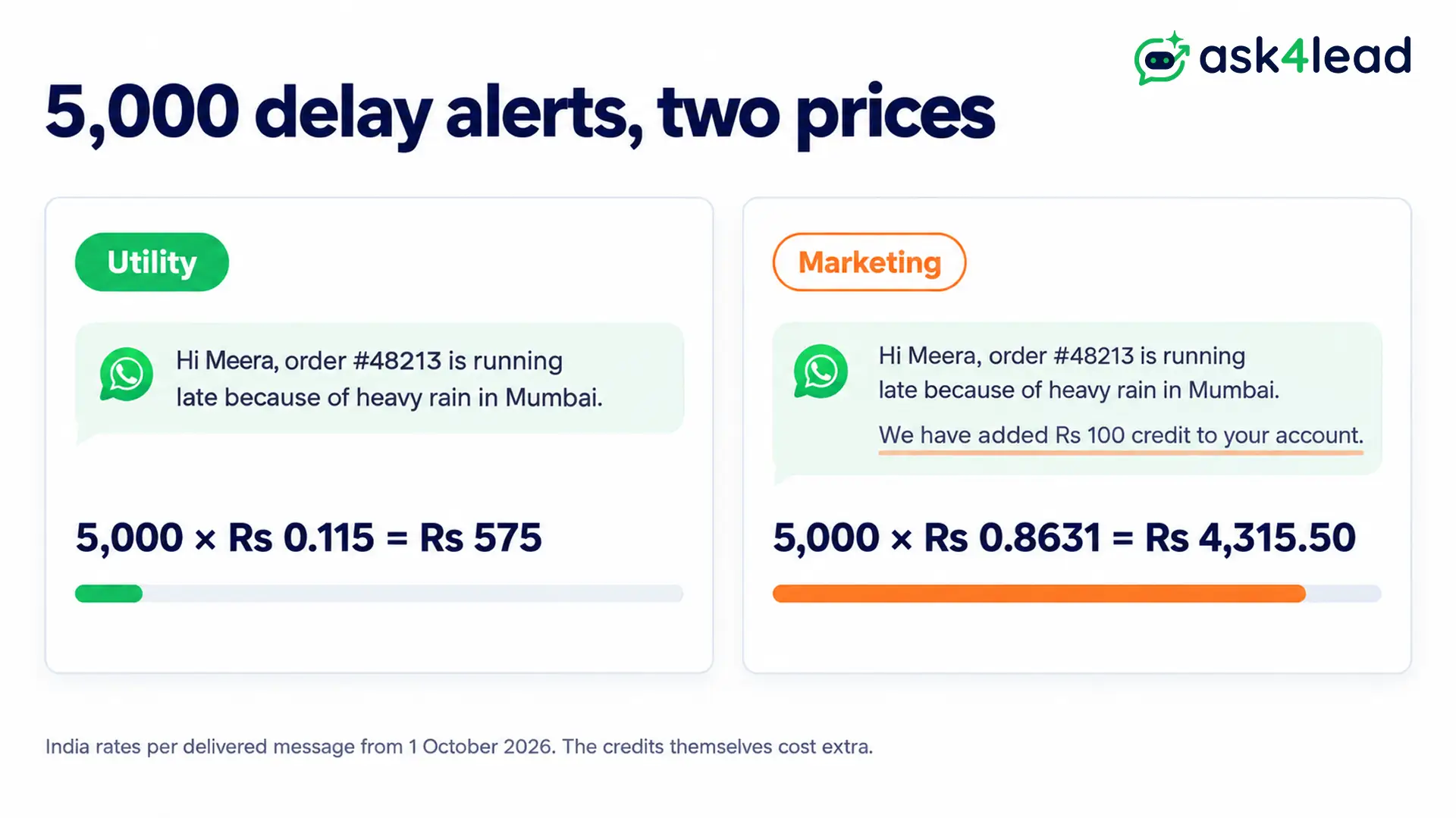
So one kind line raises the bill about 7.5 times, before you count the Rs 100 credits. Instead, send the plain delay alert, then offer the credit in your reply to customers who complain.
Meta’s pricing rules also charge utility templates even inside the 24-hour window since 1 October 2026. The 2026 WhatsApp API pricing guide lists every rate, and your provider may add a fee.
Why customers miss a WhatsApp alert message
Customers often miss an alert for reasons on their own phone, so plan for it. WhatsApp lets anyone mute a chat for 8 hours, 1 week or always. Phones can also switch off WhatsApp’s notifications entirely.
- Muted chat: the alert still arrives, but it makes no sound. So put the action in the first line, where the preview shows it.
- Notifications off: the customer has to turn them on in the phone’s Settings, under Notifications, then WhatsApp.
- Not delivered: the cause may be yours, such as a low quality rating. This list of WhatsApp messages not delivered covers 14 causes.
The free WhatsApp Business app also has an Alerts Center, a separate space for your own business updates. WhatsApp suggests checking it as often as your inbox, so you do not depend on catching a push notification.
This advice does not replace bank SMS alerts. For instance, RBI’s June 2026 amendment requires banks to send an instant SMS for electronic transactions above Rs 500. That rule starts on 1 January 2027, so a WhatsApp notification message can only add to the SMS.
Which alerts to set up first
Start with security alerts (samples 1 and 2), because a hijacked account costs you the customer’s trust for good. Next, add the payment failed and delivery delay alerts, since each one answers a question the customer would otherwise call about.
Before you submit any WhatsApp alert message, check that you have:
- What happened, the masked account or order, and the time
- One clear action, such as a reply, a button or a phone number
- No offer, credit or renewal line anywhere in the template
- OTPs kept in a separate authentication template
- The customer’s opt-in for WhatsApp messages on record
Once your templates pass review, each WhatsApp alert message answers the customer’s first question before they need to call.
Send alerts and catch “that wasn’t me” replies from one number
Alerts bring replies at odd hours, and a missed “NOT ME” at 2 am costs more than the message. Ask4Lead, a humanized AI WhatsApp chatbot and CRM, covers that loop:
- Template builder: insert variables like {{1}} that fill from your CRM data, then track each template as Pending, Approved or Rejected.
- Campaigns: filter customers by tag, lead source or pipeline stage, pick an approved template and schedule a maintenance notice.
- Account Health: see your Green, Yellow or Red quality rating and messaging limit, with a warning when it drops to Yellow.
- Real-time updates: get a push notification when a customer replies, so your team sees a fraud reply at once.
Ask4Lead sells this software, and each feature named here appears on its features pages.
Sign Up Free on Ask4Lead: 100 AI Credits Included
FAQs
1. What is a WhatsApp alert message?
It is a short, time-sensitive update about the customer’s own account, payment, order or safety, sent as an approved template.
2. How do I write an alert message on WhatsApp?
Say what happened, name the masked account or order and give the time. Then end with one action, such as “Reply NOT ME”.
3. Is a WhatsApp alert message free to send?
In the WhatsApp Business app, yes. On the API, Meta charges a utility fee per delivered message, even inside the 24-hour window.
4. Can I send an OTP as a utility alert?
No. Meta allows one-time passcodes only in authentication templates, so a utility or marketing template cannot carry them.
5. What is Alerts Center in WhatsApp Business?
It is a space in the WhatsApp Business app that gathers your important business updates in one place.
