
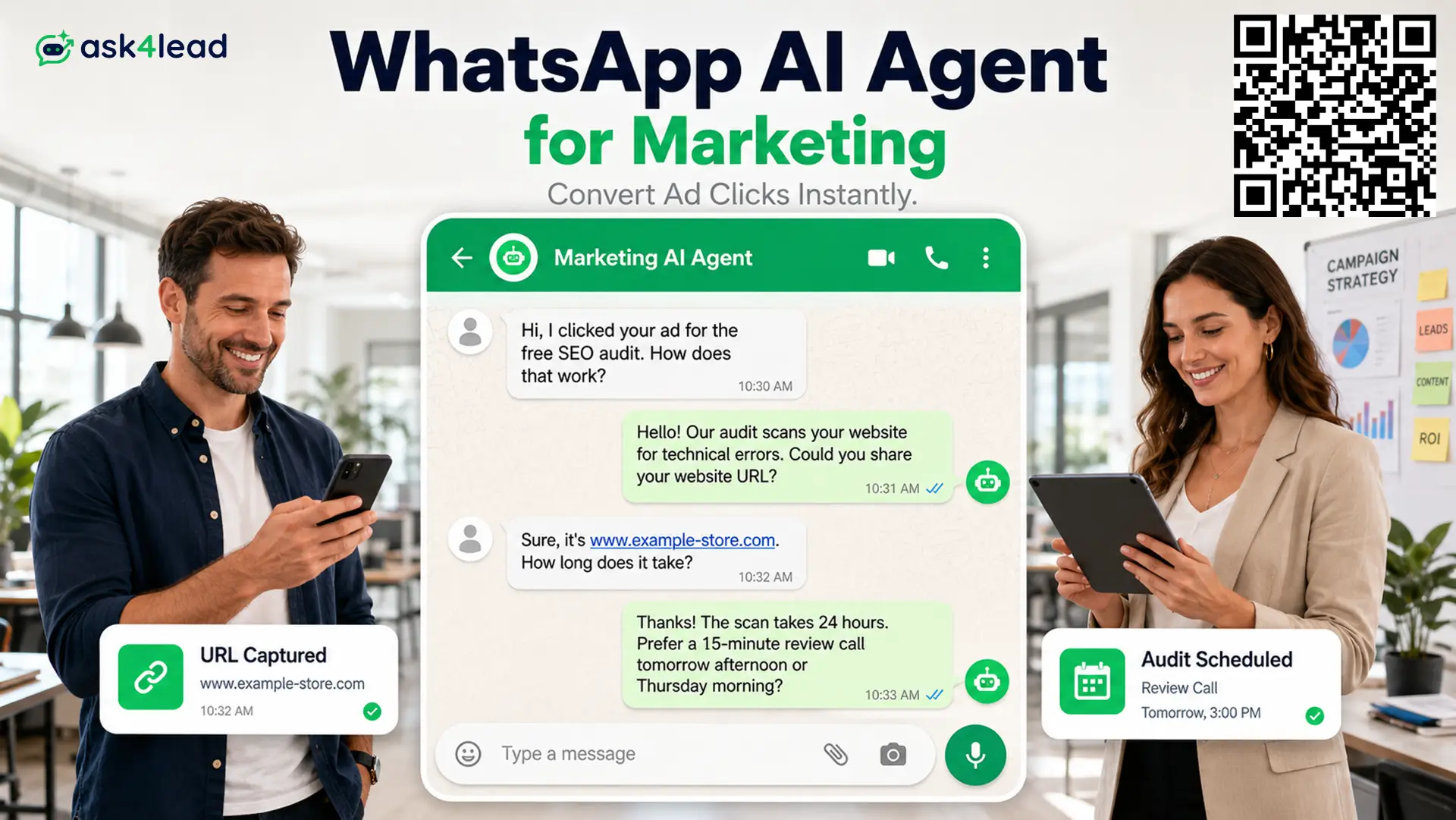
A WhatsApp AI Agent for Marketing is an AI assistant that answers every click-to-WhatsApp ad lead in seconds, qualifies it by need, budget and timeline, and hands your team a lead with the full context attached.
Ask4Lead runs this as a humanized AI WhatsApp chatbot and CRM that replies like a person, not a button menu.
Most marketing teams spend hard on the click and lose the lead in the 5 minutes after it. A rigid auto-reply or a slow inbox turns a paid click into nothing.
This page is for in-house growth and demand-generation marketers who run WhatsApp ads and own the cost per lead.
It covers what the agent does, how it lowers cost per lead, how it revives a cold list without burning your number, and what it costs to run.
What a WhatsApp AI Agent for Marketing Does
A WhatsApp AI Agent for Marketing handles 4 jobs: it replies to ad clicks 24/7, qualifies and scores each lead, keeps routine questions off your team, and re-engages cold leads through opt-in broadcasts.
Every conversation lands in one pipeline with the context attached.
| Job | What the agent does |
| Speed to lead | Greets every click-to-WhatsApp lead in seconds, at 2 AM or on a holiday |
| Qualification | Asks about need, budget and timeline, then scores the lead hot, warm or cold |
| Deflection | Answers offer, pricing and eligibility questions so a marketer never touches them |
| Reactivation | Runs opt-in WhatsApp campaigns to past leads who never converted |
WhatsApp messages get opened and read at rates email cannot match, so the reply your agent sends actually gets seen. The gap is speed and relevance, and that is what the agent closes.
1. It replies in the reader’s own words, not a menu
A menu bot makes the lead pick from options you guessed in advance. The AI Sales Assistant reads a free-text message, asks a follow-up, and captures what the lead actually wants.
2. It scores the lead before a marketer sees it
Every lead arrives tagged hot, warm or cold with the reason attached. Job seekers, vendors and spam are filtered out before they reach the shared team inbox.
3. It answers from your campaign, not the open internet
The agent runs only on an AI Knowledge Profile built from your offers, landing pages, price list and promo codes. It never invents a discount you are not running.
Why Marketing Teams Lose the Lead in the First Few Minutes
A person who clicks a WhatsApp ad is comparing 3 or 4 options at once. Reply speed, not brand recall, usually decides who gets the conversation, and every minute of delay after the click drops the odds of a reply.
The research on lead response time is blunt: contact rates fall sharply after the first 5 to 10 minutes. Paid clicks leak at predictable points:
- Evening and weekend clicks that sit unread until the next working day
- A rigid auto-reply that answers a specific question with a generic menu
- A marketer who checks the inbox between meetings, not in real time
- High-volume campaigns that bury the 5 leads worth calling under 50 that are not
An AI agent that replies instantly closes that gap for every lead, not just the ones that land in office hours. The cost of the click is already spent; the only question is whether anything answers it.
Lowering Cost Per Lead From Click-to-WhatsApp Ads
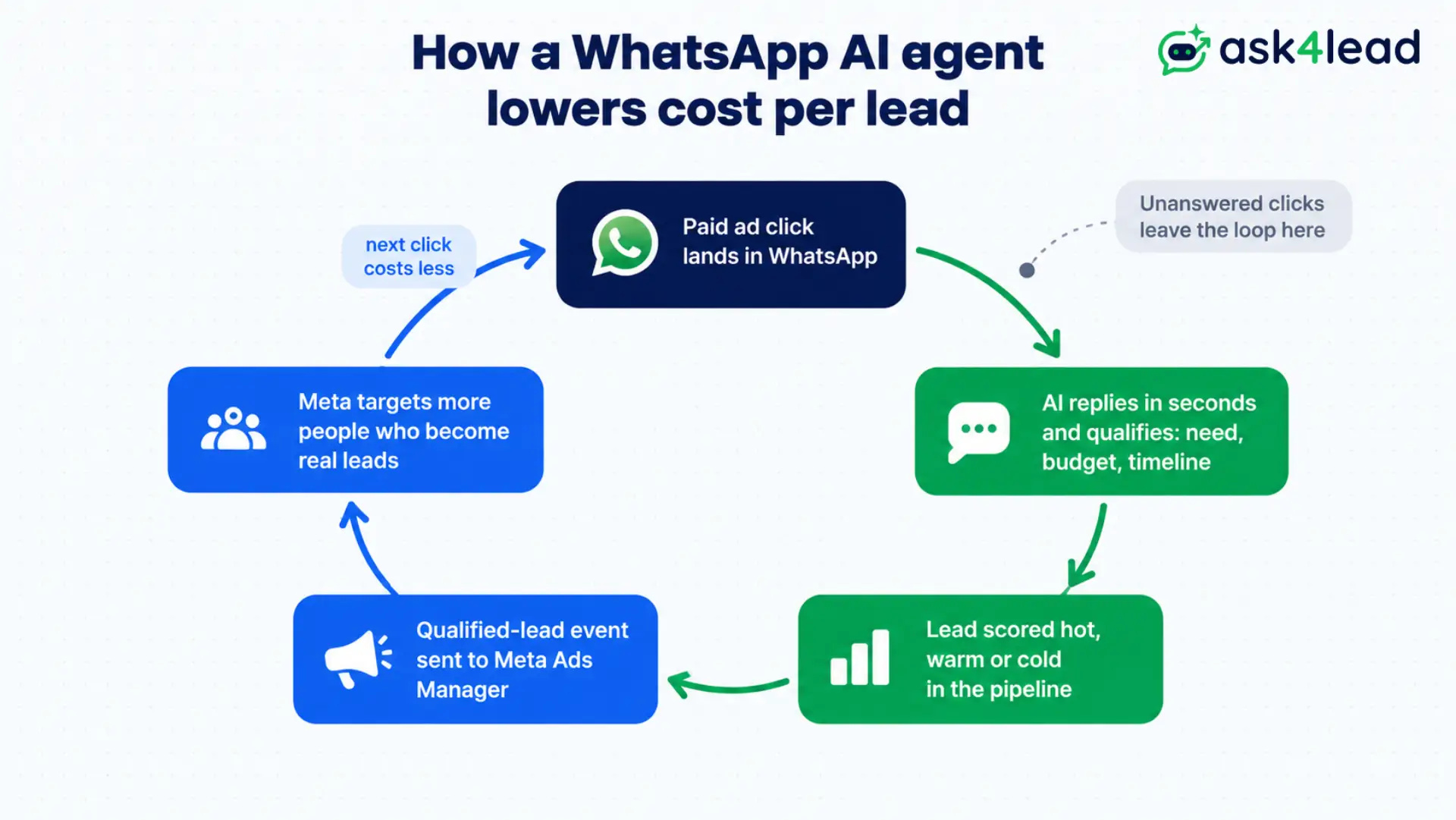
A WhatsApp AI Agent for Marketing lowers cost per lead in 2 ways: it converts more of the clicks you already pay for by replying fast, and it feeds Meta cleaner signal about which clicks became real leads so the next round of targeting is sharper.
The image below traces that feedback loop from ad click to a cheaper next click.
1. Answer every click so none of the spend is wasted
A click with no reply is a full-price lead lost. The agent picks up ads that click to WhatsApp the moment they land and starts a real conversation, so more of the media budget turns into pipeline.
2. Send qualified-lead events back to Meta
When the agent marks a lead qualified, that event can be reported to Meta Ads Manager. The algorithm then optimises toward people who become real leads, not just people who tap, which pulls the cost per qualified lead down over time.
3. Route only the leads worth a call
Your daily work queue shows the marketer or SDR a ranked list of who to call today. Time goes to the hot leads, so the cost per closed deal drops even when cost per click does not.
Reactivating a Cold Lead List Without Risking Your Number
A WhatsApp AI Agent for Marketing can re-open old leads that email stopped reaching, but marketing sends carry risk.
WhatsApp scores every business number for quality, and a broadcast people report or block pulls that score down for every contact, not just that campaign.
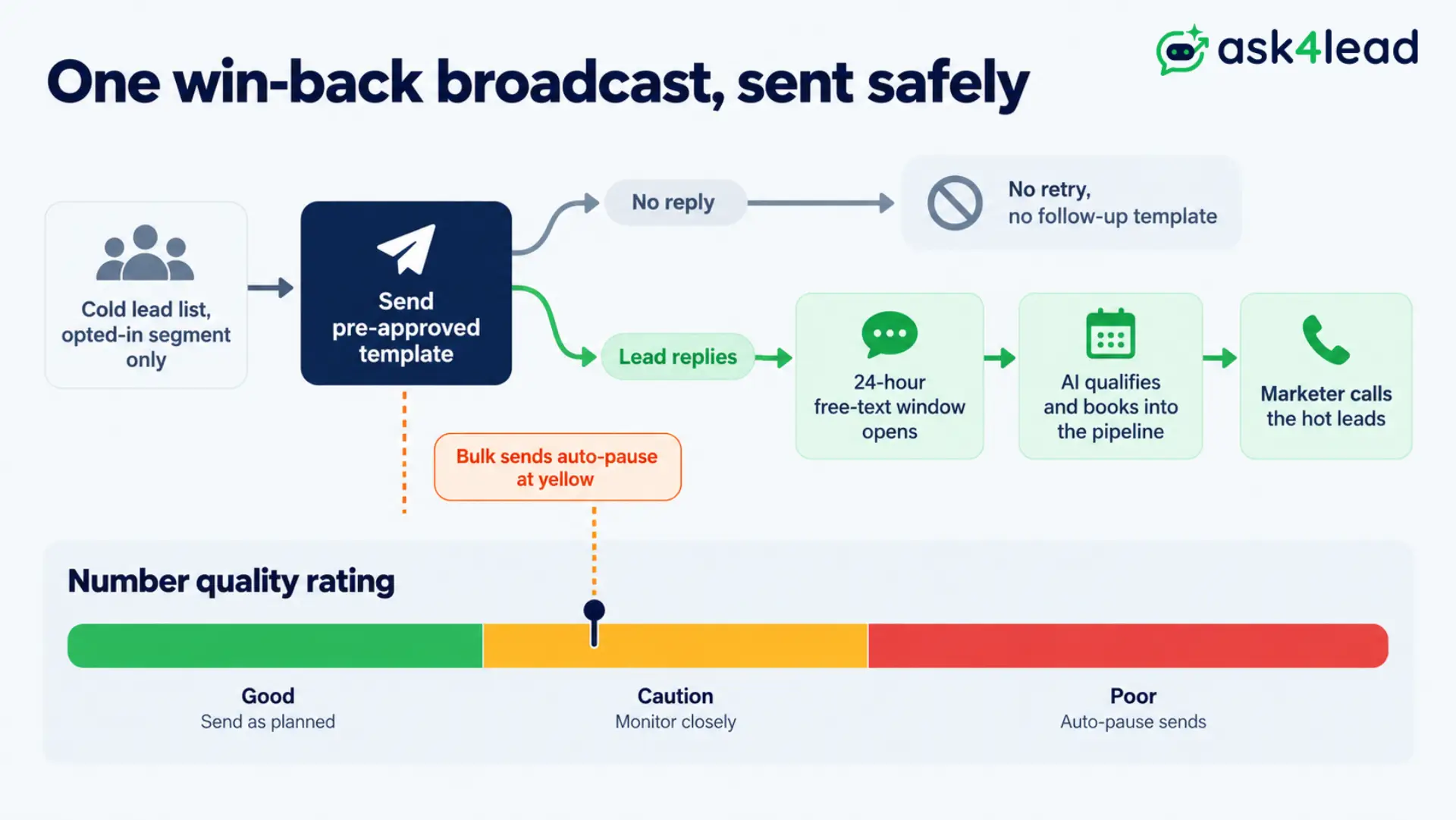
The image below shows the safe path for a win-back broadcast and where the quality rating stops it.
1. Message only opted-in contacts, with a template
Outside the 24-hour window after a lead’s last message, WhatsApp requires a pre-approved template. Ask4Lead sends win-back offers only to contacts who opted in, using templates Meta has already cleared.
2. Let the AI work the replies, not just the send
A broadcast to 2,000 cold leads can return hundreds of replies in an hour. The agent works every one, qualifies who is ready, and books the rest into the 9-stage sales pipeline.
3. Pause bulk sends before the rating drops
Account health checks watch the quality rating and hold outbound campaigns if it slips to yellow, so one aggressive send does not take the whole channel offline.
Inbound replies inside the 24-hour window are the cheapest message type, and message credits last far longer when the agent is built to answer rather than broadcast.
Meta bills per message by category and country, listed on Meta’s WhatsApp pricing page.
Keeping the AI On-Brand and Escalating the Rest
A marketing team’s WhatsApp number carries the brand voice, so the agent should answer low-stakes questions on its own and pass anything sensitive to a person.
Meta also assigns messaging limits and a quality rating to each number, another reason not to let automation run unchecked.
| Message type | Who handles it |
| Offer details, delivery timelines, eligibility, FAQs | AI, on its own |
| Custom scope, discount requests, unusual timelines | AI drafts, marketer approves |
| Complaints, refunds, a frustrated tone, press queries | Human takes over, AI pauses |
Approve sensitive replies before they send
Human approval before send lets the agent draft a reply and hold it for one-tap sign-off. The approval queue is a control feature, not a compromise, and it is usually the first thing a marketing lead asks to see.
Count the leads the AI skips
The failure that hurts is not a wrong answer. It is a lead that matched no rule and was never counted, so no one followed up.
Ask4Lead shows a skipped count beside the handled count and a switch to pause the AI in one tap.
How Ask4Lead Runs Your Marketing Team’s WhatsApp Funnel
Ask4Lead works as your WhatsApp AI Agent for Marketing end to end: it connects your number, learns your campaigns from your own files, qualifies every ad lead, and reports what each campaign produced.
Setup takes about 15 minutes.
1. Load your offers, landing pages and promo codes
Upload campaign briefs, price lists and active discount codes into the Knowledge Profile. The agent answers from your live offers and stops when a question goes past them.
2. Qualify every lead the same way
Set the 3 questions every lead answers: what they need, what they have to spend, when they need it. A warm lead that goes quiet gets an automated follow-up on a schedule.
3. See which campaign produced the lead
Campaign reporting ties each lead back to the ad or broadcast that brought it in, so budget decisions rest on qualified leads, not clicks. The conversation dashboard shows reply times and volumes at a glance.
Core Ask4Lead Features for Marketing Teams
Ask4Lead works as a full WhatsApp AI Agent for Marketing, not a single feature. Every item below maps to one outcome: more qualified leads from the same ad budget.
The same platform supports marketing agencies running WhatsApp for clients and e-commerce teams handling product questions.
| Feature | What it does for your marketing team |
| Plain-English AI conversation | Turns a free-text ad reply into a qualified lead with no menu |
| Lead scoring | Tags every lead hot, warm or cold with the reason attached |
| Opt-in broadcast campaigns | Re-engages cold lists with tracked open and reply rates |
| 9-stage CRM pipeline | Tracks every ad click from first message to closed deal |
| Campaign attribution | Shows which ad or broadcast produced each qualified lead |
| Human approval queue | Holds complaint and discount replies for one-tap sign-off |
Marketing Scenarios Ask4Lead Handles
These are the moments where a slow or generic reply wastes ad spend, and where a WhatsApp AI Agent for Marketing earns its place.
1. The midnight ad click
A prospect sees your Instagram ad for a course at 11 PM and asks how the payment plan works.
The agent answers in seconds, confirms eligibility, applies the campaign promo code, and sends a checkout link. The sale closes before the team is back online.
2. The high-volume lead-gen campaign
A webinar campaign drives 400 clicks in a day. The agent qualifies all of them, filters out students and vendors, and books the 30 that fit into the pipeline.
Your SDR calls a short, warm list instead of dialing 400 cold.
3. The dormant list revival
You have 5,000 leads from last quarter that email no longer reaches. You broadcast a free audit offer to the opted-in segment.
The agent works the replies, qualifies who is ready to buy, and turns a list you already paid for into booked calls.
FAQs
1. Can I connect this to my Meta ads?
Yes. Set your Ask4Lead number as the destination for click-to-WhatsApp ads. The agent replies to every click instantly, and qualified-lead events can be sent back to Meta Ads Manager to lower your cost per qualified lead over time.
2. How is this different from a landing page form?
A form collects fixed fields and loses the leads who do not finish it. The agent has a real conversation on a channel the lead already uses, captures more context, and answers questions a form cannot.
3. Will the AI ever send something off-brand?
Only low-stakes replies go out on their own. Discount requests, complaints and anything with a frustrated tone are drafted and held for a marketer to approve before they send.
4. What does it cost to run?
Two costs: the platform fee for the AI and CRM, and Meta’s per-message charges by country and category. Replies inside Meta’s 24-hour customer service window are the cheapest, so an inbound-first setup makes credits go further.
5. Can it revive an old lead list without getting my number banned?
Yes, within limits. It messages only opted-in contacts through pre-approved templates, works the replies, and pauses bulk sends if the quality rating drops.
6. Is a WhatsApp AI agent still worth it now that Meta has a built-in one?
Meta’s native agent answers basic questions inside WhatsApp. An agent that scores leads, runs a CRM pipeline, attributes campaigns and routes to the right person does a different job.
Turn Your Ad Budget Into Qualified Conversations
Marketing on WhatsApp runs on speed and relevance. A lead who asks a specific question at midnight should get a real answer, a qualified handoff, and a marketer who already knows what they want.
A WhatsApp AI Agent for Marketing gives you that without new headcount, protects the brand voice, and ties every lead back to the campaign that paid for it.
Ask4Lead pairs the humanized conversation with a full 9-stage CRM, so no lead falls between the ad click and the pipeline.
Start free with 100 AI credits
Sign up free and connect your WhatsApp number to watch the agent qualify a real ad lead in your own pipeline, no card required.
For the wider playbook, read how to turn WhatsApp into a high-converting sales machine, or the tactics in WhatsApp marketing strategy and WhatsApp marketing software.