
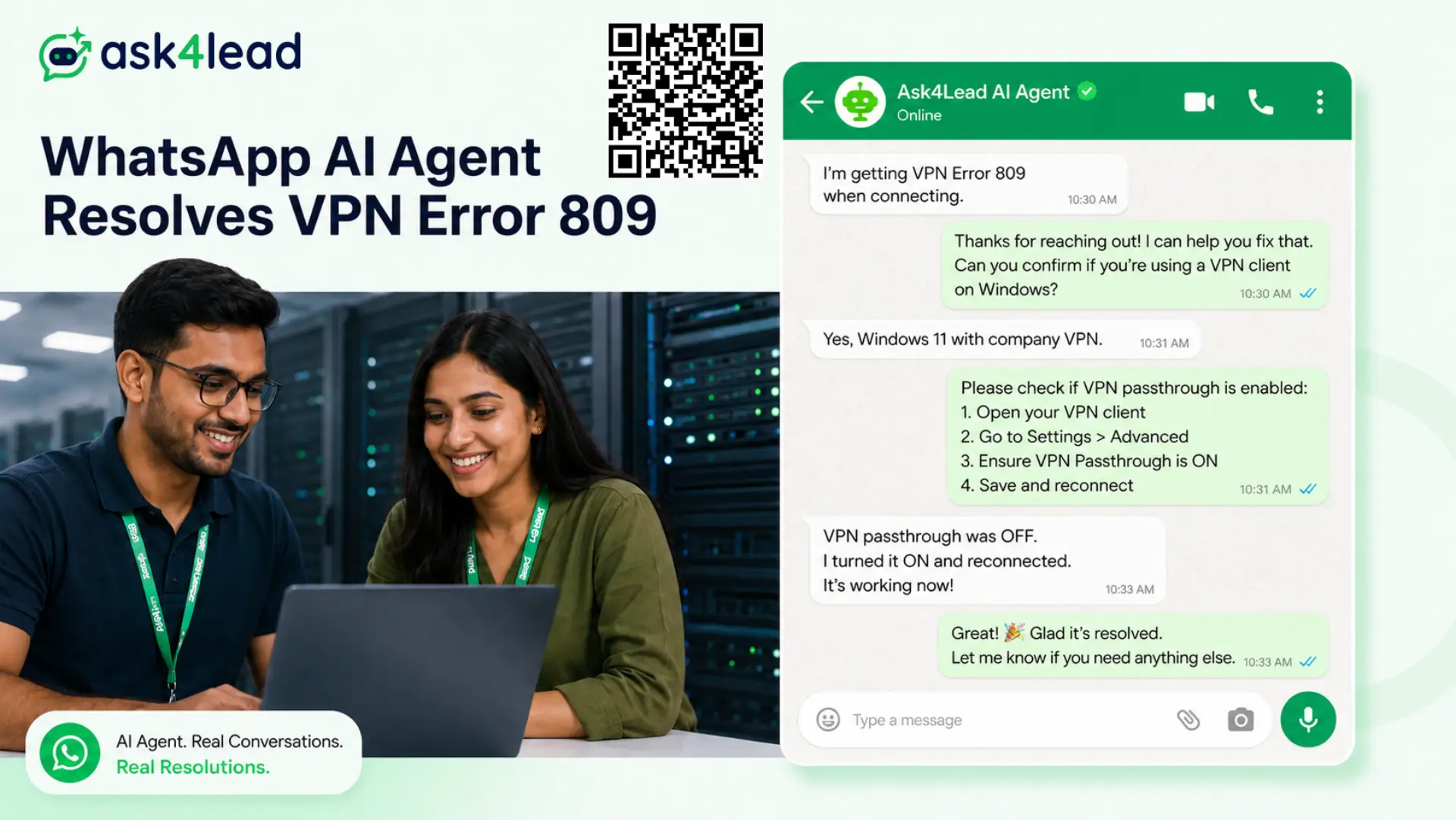
IT service providers and managed service providers (MSPs) lose client trust to slow Level-1 (L1) ticket replies more often than to bad engineering.
Ask4Lead’s WhatsApp AI agent answers routine helpdesk requests the moment they land, in a real conversation instead of a button menu, then hands the ticket to your engineers with full context the moment it actually needs one.
Sign Up for Free – 100 AI Credits · Chat with us on WhatsApp
The SLA Problem Every IT Service Provider Already Knows
A corporate user locked out of a VPN at 9 PM does not care how strong your Tier-3 team is. They care that nobody answered for 40 minutes, then escalated to their manager, then turned into a complaint on the next contract renewal call.
This is rarely a skills problem. It’s a volume problem: the same handful of L1 requests, password resets, VPN errors, printer setup, software access, arrive constantly and eat hours that should go to real engineering work.
- Rigid button menus can’t handle a request that isn’t one of the listed options
- A separate ticket-portal login adds friction for a user who is already blocked
- Senior engineers get pulled into resets and unlocks instead of migrations and security audits
- Every missed SLA chips away at the next renewal conversation, not just today’s ticket
“WhatsApp Already Has Built-in AI” Isn’t the Same as a Helpdesk
Meta’s own WhatsApp Business app now ships a built-in AI assistant, and for a single owner answering a handful of FAQs, it’s genuinely useful. It falls apart the moment a real IT team sits behind the number.
The native assistant has no access to your specific SOPs, error-code library, or security guidelines beyond a generic guess.
It can’t route a conversation to whichever engineer is free right now with the ticket’s full history attached, and it lives inside one inbox tied to one device, not a team of L1 through L3 staff working the same queue.
Ask4Lead runs on the same WhatsApp number your clients already message, but grounds every reply in your own knowledge base instead of a generic assistant’s best guess, and puts every conversation inside a shared team inbox your whole support team can work from together.
See Your Helpdesk on Ask4Lead – Sign Up Free
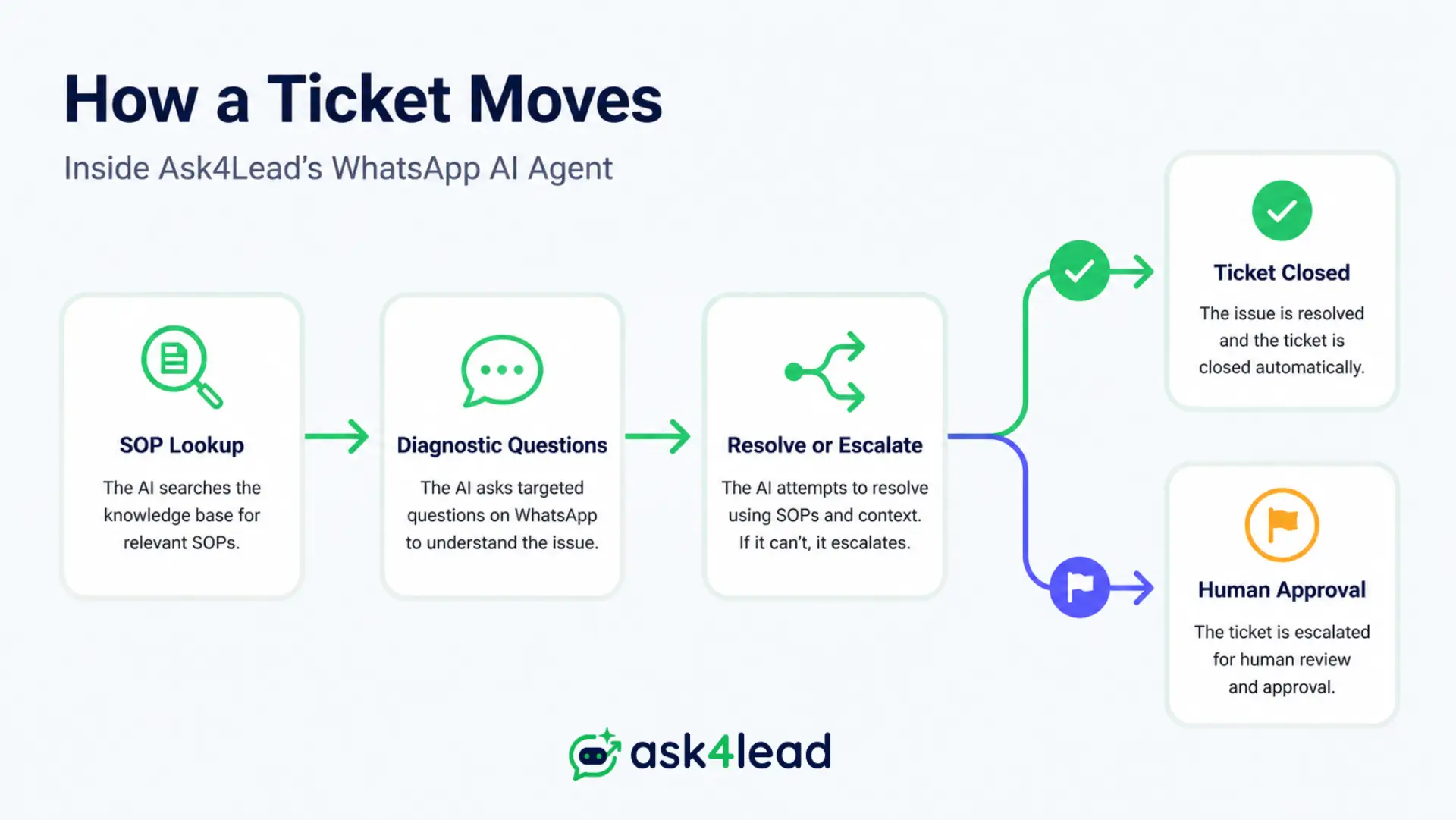
How the AI Agent Handles a Ticket, Start to Finish
- It reads your uploaded SOPs, server diagrams, and error-code library before it answers anything, not general internet knowledge
- It asks the same clarifying questions an L1 technician would: operating system, exact error message, what was already tried
- It resolves the ticket directly when the fix is documented and safe to hand to the end user
- It escalates instantly, with the full thread attached, the moment a ticket is high-severity or touches a security control
Outside of live troubleshooting, the same WhatsApp Campaigns engine sends scheduled alerts ahead of patch windows or planned downtime, with delivery and read-rate tracking, so clients hear about maintenance from your team first.
A Real Conversation, Not a Script
End user: “Hi, trying to connect to the VPN from home, getting Error 809.”
AI agent: “Error 809 almost always means your home router is blocking the VPN’s UDP ports. Can you check if ‘VPN passthrough’ is switched on in your router settings?”
End user: “Found it, turned it on, connected now. Thanks.”
AI agent: “Glad that worked, logged as resolved. If a security-level change is ever needed to fix something like this, I’ll flag it for one of our engineers to approve first, never on my own.”
Notice what the agent didn’t do: it never told a non-technical user to switch off a security control on its own judgment.
Every AI-drafted reply that touches a firewall setting, an MFA toggle, or an admin permission waits for a human to approve it before it reaches the client.
That one rule is the difference between a genuinely useful bot and a liability with a friendly tone.
One Number, Real Team Collaboration
Most low-cost “WhatsApp bot” tools on the market run on an unofficial browser connection to WhatsApp Web. It looks quick to set up, but it breaks every time WhatsApp updates its interface, and it puts the business number at real risk of a ban.
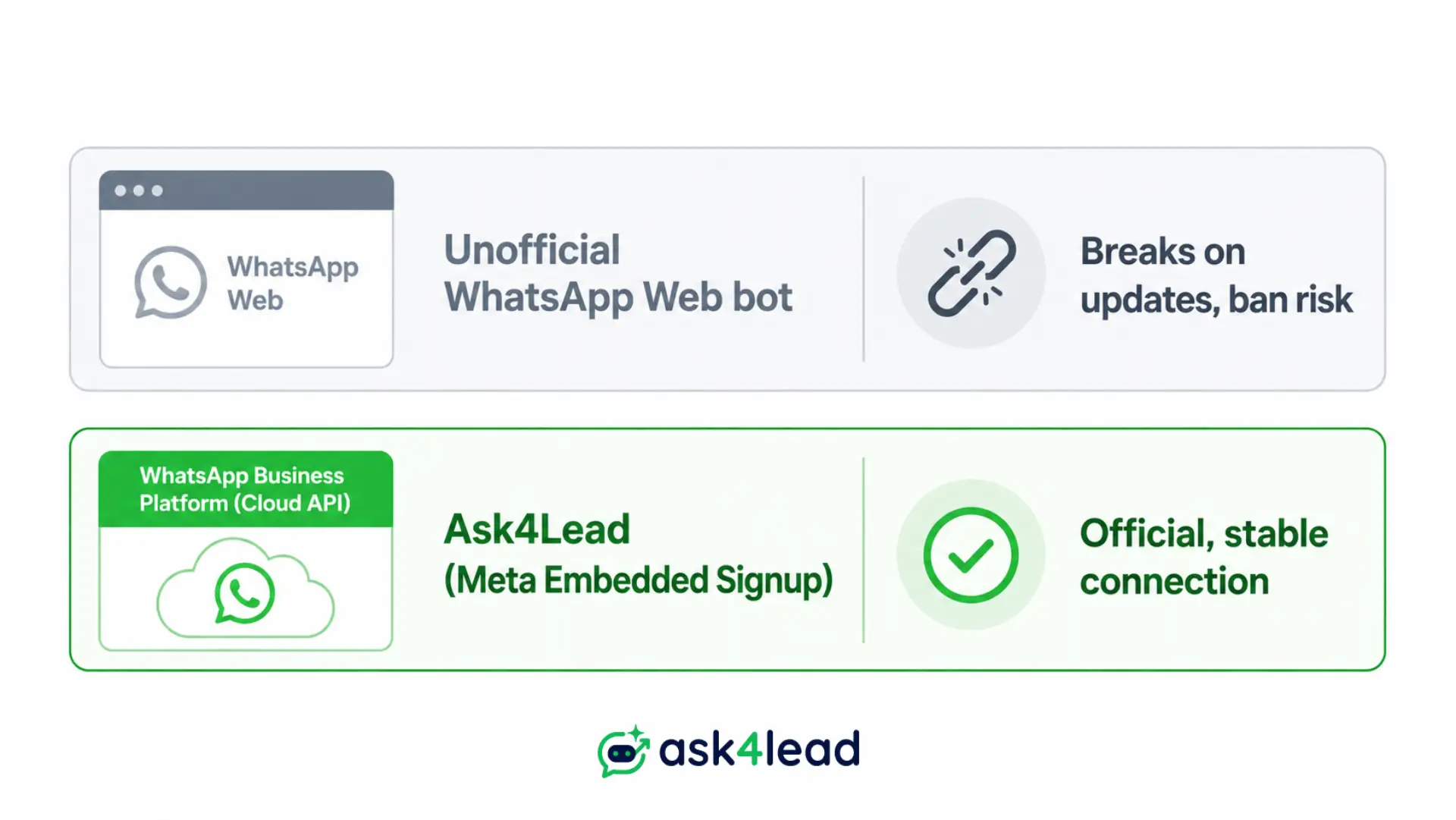
Ask4Lead connects through Meta’s official WhatsApp Business Platform via Meta’s own Embedded Signup, the same stable connection enterprise support tools rely on, set up in minutes rather than a developer project.
Every conversation lands in the shared inbox, so an L1 tech can pick up a chat the AI already triaged with nothing to re-explain and nothing lost between shifts.
Get Your Team Set Up – Sign Up Free
Core Features for IT and MSP Teams
| Feature | What It Does for Your Team |
| Plain-English conversation | Diagnoses issues through real dialogue instead of a fixed button menu |
| Knowledge-grounded answers | Reads your SOPs and error-code library instead of guessing |
| Human approval before send | Security-sensitive replies wait for engineer sign-off, every time |
| Shared team inbox | L1 through L3 work the same queue from one WhatsApp number |
| 9-stage CRM pipeline | Tracks every ticket from first message to closed, visually |
| AI dashboard | Shows resolution rate, escalation rate, and response time in one view |
Real Scenarios That Build Client Trust
A user locked out of Active Directory at 11 PM gets a verified reset link in minutes, and your engineers start the next morning without a backlog of trivial tickets waiting.
A client’s SQL database going offline gets flagged the moment severity is detected, so a Lead SysAdmin takes over the exact thread with full context already attached, no re-explaining the problem.
A weekend firewall patch across 50 client sites goes out as one scheduled broadcast, with the AI agent fielding routine ETA questions while your team handles the real work.
For a deeper technical breakdown, including how to roll this out to your own team step by step, see our full guide to WhatsApp AI agents for IT services.
FAQs
1. Does the WhatsApp AI agent replace our IT engineers?
No. It resolves routine, well-documented L1 requests and escalates anything complex, ambiguous, or security-sensitive to a human with full conversation context attached.
2. How is this different from WhatsApp’s own built-in AI assistant?
The native assistant works from generic knowledge and one inbox. Ask4Lead is grounded in your own SOPs and error-code library, and runs through a shared inbox your whole team can access together.
3. Is it safe to let AI handle security-related tickets?
Any AI-drafted reply that touches a security control, like a firewall setting or an access permission, waits for a human’s sign-off before it reaches the client (see the human-approval section above).
4. Will using this put our WhatsApp number at risk of a ban?
No. Ask4Lead connects through Meta’s official WhatsApp Business Platform via Embedded Signup, not an unofficial browser workaround.
5. Can we connect our existing SOPs and knowledge base?
Yes. Upload PDFs, wikis, or server documentation and the AI agent answers from that material directly.
6. How fast can our team get this live?
Onboarding runs through Meta’s Embedded Signup flow, so a verified connection is typically minutes, not a developer project.
Stop Losing Renewals to Slow L1 Replies
Every SLA breach on a trivial ticket chips away at the next contract conversation.
Give your helpdesk a WhatsApp AI agent that actually talks to people, escalates safely, and keeps your whole team in one shared queue.